


WhatsApp Marketing Software for Businesses
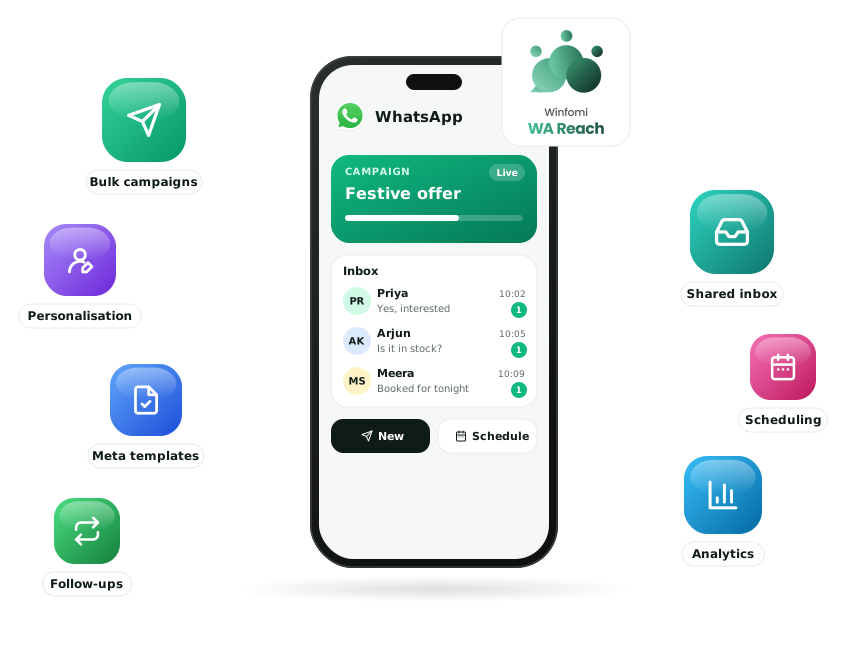
Winfomi WA Reach is a WhatsApp bulk messaging app built on the official WhatsApp Cloud API. Send personalised campaigns to your contact lists, schedule them, answer every reply from one Inbox and see exactly what was delivered, read and answered.
- Official WhatsApp Cloud API
- Meta-approved templates
- Runs in your browser
How to Use WhatsApp Marketing for Your Business?
Connect with more customers and promote your business through WhatsApp. WA Reach helps Indian businesses simplify bulk messaging, share promotional offers and generate customer enquiries.
- Promote Offers: Share festival discounts, seasonal deals and special promotions.
- Announce New Products: Showcase new arrivals, product launches and latest collections.
- Reach More Customers: Send bulk WhatsApp messages to your target audience.
- Share Festival Greetings: Connect with customers during Diwali, Pongal, Eid and other occasions.
- Promote Business Events: Share exhibition invitations, store openings and product announcements.
- Generate Enquiries: Encourage customers to explore your products and contact your business.
What is WhatsApp marketing software?


WhatsApp marketing software is a business communication solution that helps organizations send approved marketing messages, share product information, announce offers, and communicate with customers through WhatsApp.
Depending on the platform, businesses can use features such as contact management, campaign scheduling, message templates, customer segmentation, delivery reporting, and WhatsApp Business Platform integration.
Winfomi’s WhatsApp marketing solution is intended to help businesses organize customer communication and marketing workflows in one place.
What is the WA Reach app?
WA Reach is a WhatsApp marketing app from Winfomi. It lets a business send personalised bulk WhatsApp messages to its contact lists, schedule campaigns, reply to customers from one Inbox, send follow-ups and track delivery, read and reply rates. It runs in a web browser and connects to WhatsApp through the official Cloud API.
Runs on the official WhatsApp Cloud API with Meta template approval, not a personal WhatsApp account.
Every message can be personalised from contact fields, custom fields or fixed values.
Built-in rate limiting and messaging-limit tracking keep large sends steady.
Replies, follow-ups and results live in the same place as the campaign.
Launch Your WhatsApp Marketing Campaign in 5 Simple Steps
Connect WhatsApp
Connect your WhatsApp Business Account to WA Reach.
Add Contacts
Upload or import your customer contacts.
Create a Message Template
Create your message template and submit it for Meta approval.
Create a Campaign
Select your approved template, choose your contact lists, and set up your campaign.
Launch Your Campaign
Send your WhatsApp campaign and track its performance.
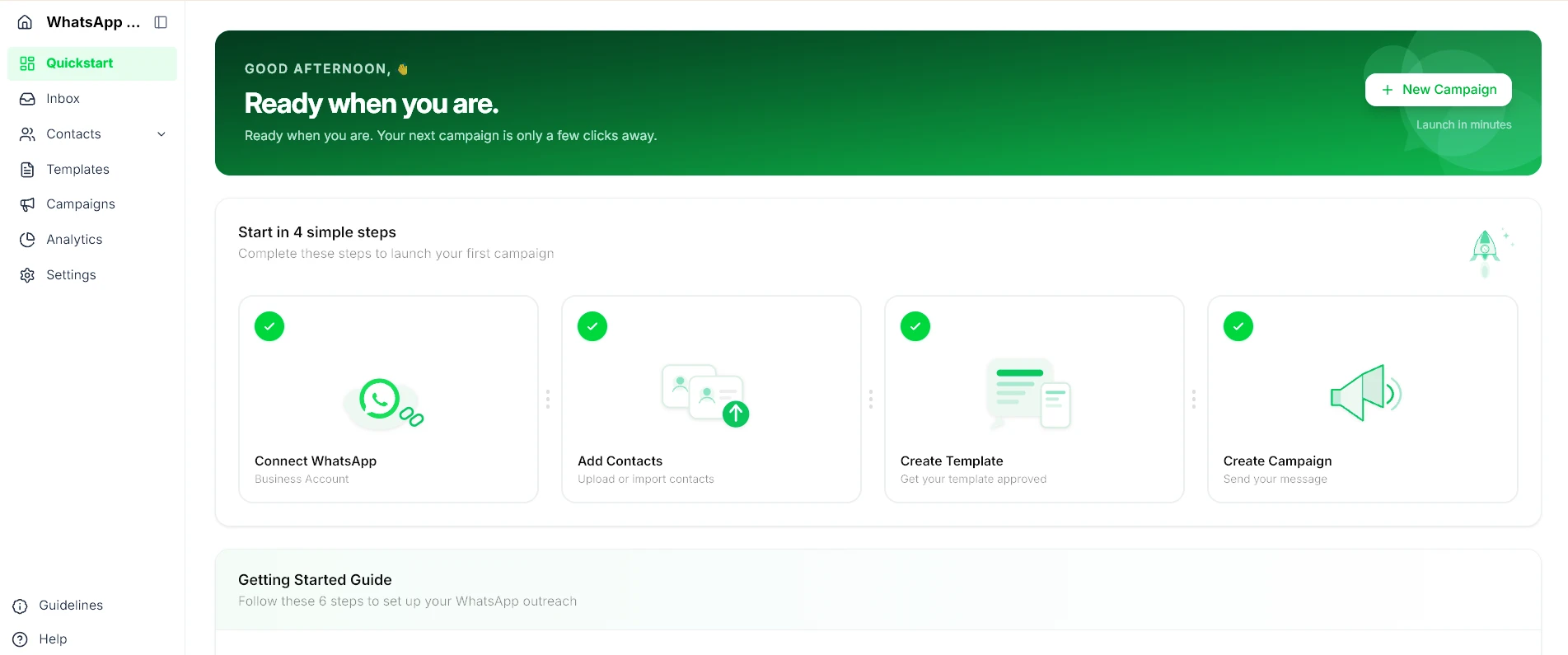
WA Reach campaign dashboard and outreach preview
Looking for WhatsApp marketing software for your business?
Explore a business messaging solution aligned with your customer engagement goals, campaign requirements, and existing workflows. Connect with Winfomi to discuss your requirements and available integration options.
Explore the Features of WhatsApp Marketing App
Quickstart
Follow the four setup steps and start a new campaign from one screen.
Inbox
Answer every customer reply with text, images, documents, video or voice notes.
Contacts
Add contacts or import a CSV or Excel file, then group them into Contact Lists.
Templates
Write messages with variables, media and buttons, and submit them for Meta approval.
Campaigns
Pick an approved template and your lists, map each variable, then send now or schedule.
Analytics
Track delivery, reads, replies and failures for each campaign, and export the report.
Settings
Manage your WhatsApp Business Account connection and account preferences.
Guidelines
Review WhatsApp messaging rules, such as consent and template requirements, before you send.
Help
Find answers and get support while you set up and run campaigns.
How to Send Bulk WhatsApp Messages With the WA Reach App
Seven steps take you from a spreadsheet of customers to a measured, personalised WhatsApp campaign.
Organise contacts
Add contacts or import a CSV or Excel file, then group them into Contact Lists.
Create a template
Write the message, add variables, media and buttons, and submit it for Meta approval.
Build the campaign
Pick the approved template, choose one or more lists and map each variable.
Send or schedule
Launch now or set a date and time. Duplicate recipients across lists are removed.
Reply from the Inbox
Answer customers with text, images, documents, video or voice notes.
Follow up
Send a Follow-up Template to keep the conversation moving.
Measure results
Track delivery, reads, replies and failures, then export the report.
Advanced WhatsApp marketing software features
Choose the capabilities your team needs to manage customer messaging and marketing communication more efficiently.
WhatsApp bulk messaging
Organize campaigns for opted in customer groups and communicate relevant offers, product announcements, and business updates.
Marketing campaign management
Structure your messaging activities around campaign objectives, customer segments, and planned communication schedules.
WhatsApp Business API integration
Explore WhatsApp Business Platform integration for business messaging workflows, approved templates, and scalable customer communication.
Customer communication
Use business messaging to share relevant updates, respond to enquiries, and maintain communication throughout the customer journey.
Campaign performance tracking
Evaluate available campaign reporting to understand message delivery, customer responses, and engagement performance.
Business messaging workflows
Identify opportunities to connect customer communication with sales, support, and marketing processes using supported integrations.
Who Can Benefit from WhatsApp Marketing Software?
Winfomi WA Reach helps businesses promote offers, share updates, and engage customers through bulk WhatsApp messaging.
Watch WA Reach in action
See a bulk WhatsApp campaign go out and the automated follow-ups that keep each conversation moving, start to finish.
- Bulk campaigns to your contact lists
- Personalised messages from contact fields
- Replies in one shared Inbox
- Automated follow-ups
Bulk WhatsApp Messaging & Automated Follow-Ups for Business · Watch on YouTube